So you’ve got a brilliant app idea, a stunning UI design, or a client presentation coming up — and zero interest in writing a single line of code. Good news: you don’t have to. iPad mockups have quietly become one of the most powerful tools in a designer’s arsenal, and most people are still massively underusing them.
Let’s fix that.
What Is an iPad Mockup, Really?
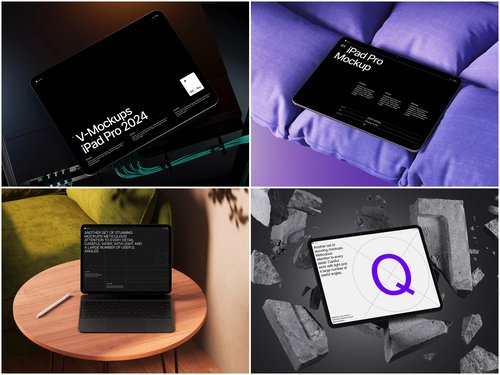
An iPad mockup is a pre-built visual template that places your screen designs inside a photorealistic iPad frame. But calling it “just a template” is like calling Figma “just a drawing app.” In the right hands, mockups become living prototypes — things you can click through, present, and test without touching a development environment.
From Static Screen to Interactive Experience
Here’s where it gets interesting. Tools like Figma, Marvel, and InVision let you link your mockup screens together using hotspots. Drop your UI into a mockup frame, connect the screens, and suddenly your client is tapping through a “real” product on what looks like an actual iPad.
The workflow is simpler than most people expect:
- Design your screens in Figma or Adobe XD
- Export each screen and place it inside your mockup template
- Link screens together using a prototyping tool’s hotspot feature
- Share a prototype link — no app store, no build, no engineering team
The result feels surprisingly convincing. Stakeholders stop imagining the product and start experiencing it.
Real-World Use Cases: iPad Mockups in Practice
This isn’t theory. Designers and product teams use this approach constantly across industries.
App Pitches to Investors Founders use interactive iPad mockups during seed rounds to demonstrate UX flow without building an MVP. It’s faster, cheaper, and frankly more visually polished than most early-stage builds.
E-learning Course Previews EdTech companies show how their learning platform behaves on tablet — swipeable lessons, quiz flows, video players — all presented through mockup-based prototypes before a single API is written.
Retail & E-commerce Testing UX researchers place shopping app designs inside iPad mockups, then run usability tests with real participants. Observers watch the session through a screen share, seeing a product that looks finished.
Agency Client Approvals Design agencies present app redesigns using interactive mockups in client meetings. The client sees their brand inside a device. Approval rates go up. Revision rounds go down.
iPad Mockups on ls.graphics
If quality matters to you — and it should — ls.graphics is worth bookmarking. Their iPad mockup collections stand out for ultra-realistic rendering that holds up even under tight presentation zoom. Scenes come with organized, clearly labeled layers that make customization fast and intuitive. You get a wide variety of shooting angles, multiple color styles, and stylish minimalist compositions that feel editorial rather than generic. The Edit Online feature lets you swap in your screens directly in the browser — no Photoshop required. And if you want to explore before committing, there’s a generous library of free scenes to try out first.
Tips for Making Mockup Prototypes Feel Real
The mockup is only half the equation. How you use it matters just as much:
- Match your screen content to the mockup’s orientation and proportions — a slightly off-scale UI breaks the illusion immediately
- Use consistent lighting in your mockup across all screens so transitions feel seamless
- Add subtle interaction cues (arrows, highlighted buttons) to guide testers through the flow
- Choose the right angle for your story — a flat lay mockup works beautifully for editorial presentations, while a perspective shot feels more natural during live demos and pitches
- Don’t ignore the background — a cluttered or mismatched backdrop pulls attention away from your UI; neutral surfaces and minimalist compositions keep the focus exactly where it belongs
Think of your mockup prototype as a first impression — you only get one shot at it. When every detail is intentional, the prototype stops being a design artifact and starts feeling like the real thing.
Conclusion
The gap between a design file and a working product used to require a developer. Increasingly, it just requires the right tools and a good mockup. iPad mockups let designers communicate ideas with a clarity that flat screens simply can’t match — and when combined with prototyping tools, they become something closer to a product than a presentation. If you’re looking for a reliable starting point, ls.graphics offers some of the most refined mockup resources available, with enough free content to get meaningful work done before spending a dollar.
Design smart. Present smarter.